
Checkout
More payment options, fewer abandoned carts
Each payment method is its own clear choice in checkout, not hidden behind one generic “GoPay” button.

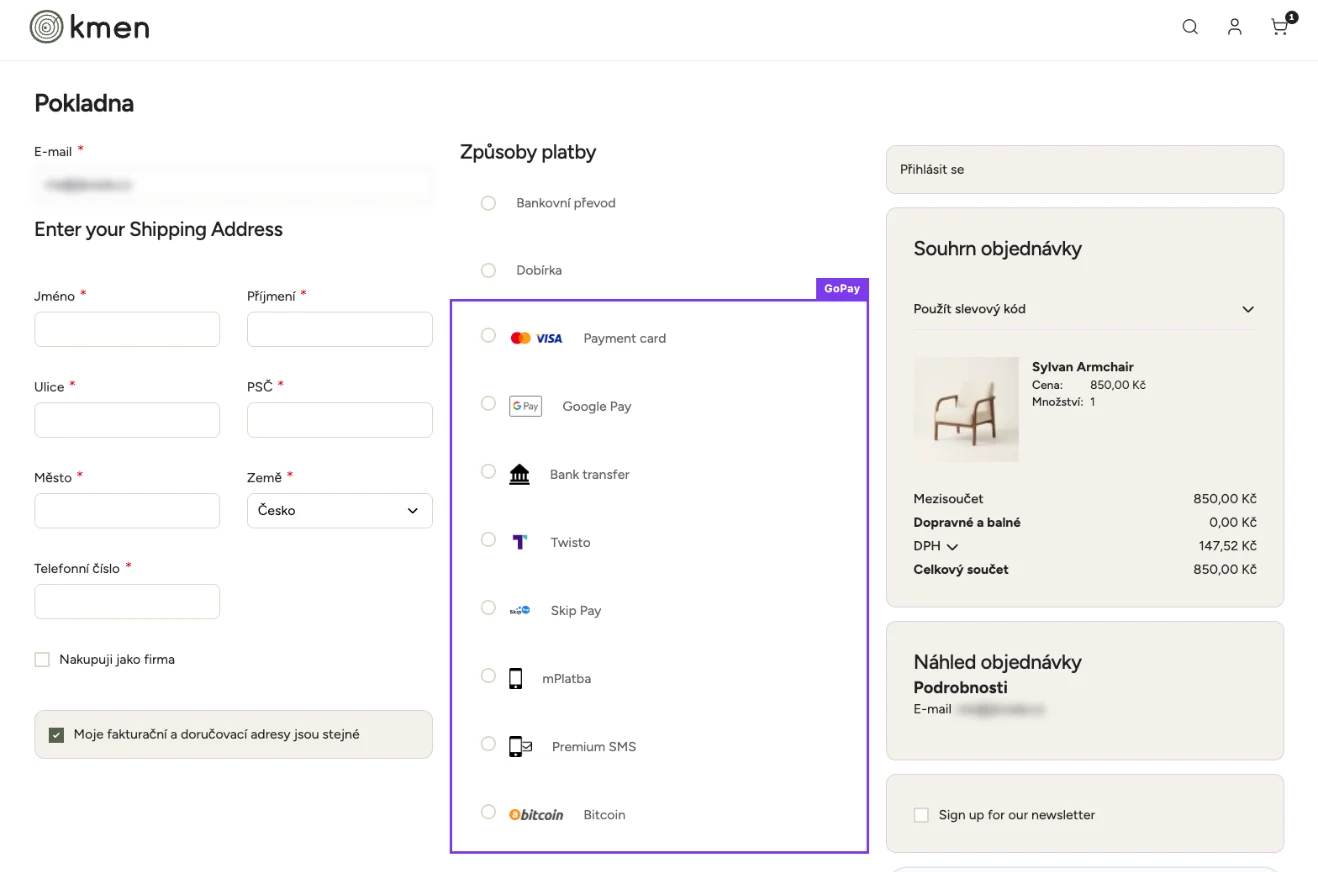
The store checkout. GoPay methods in purple, each its own choice.

A GoPay module for Magento 2 and Hyvä: every common Czech and Slovak way to pay, built into your checkout, with orders that keep themselves up to date.
Included in your plan
We install, configure and update it for you. The module is not sold separately.
Get my assessment and demo Deedhold client? Request the module in the portalChallenge
Paying is where shoppers decide whether to complete the purchase. A customer who can’t find their bank, has to retype card details or lands on an unfamiliar page often gives up. The module keeps that step short, familiar and trustworthy, and takes the payment admin off your plate.
Solution
Customers pay the way they are used to: by card, Google Pay or Apple Pay, a quick transfer from their own bank, or “buy now, pay later”. We built it for our own platform, with no third-party plugin, and it talks to GoPay only through GoPay’s official PHP library.
Checkout
Each payment method is its own clear choice in checkout, not hidden behind one generic “GoPay” button.
Payment
Payment can open in a GoPay window over your store, so the customer never feels sent away.
Pay later
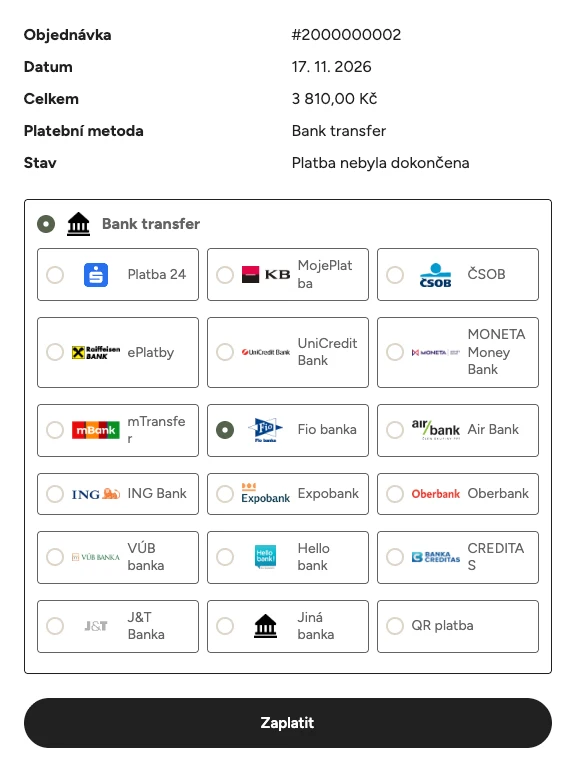
If a payment fails or the customer closes the window, they can pay later from a secure link.
Back office
Paid orders are invoiced automatically, refunds go back through GoPay and unpaid orders are tidied up for you.
Payment methods, bank choice, pay later and clear confirmations, the way customers know them from other online stores, now in your Magento checkout.
Each method is its own option in checkout, with its own name, description, logo, sort order and country or order-value limits. You switch on the ones your GoPay contract includes.
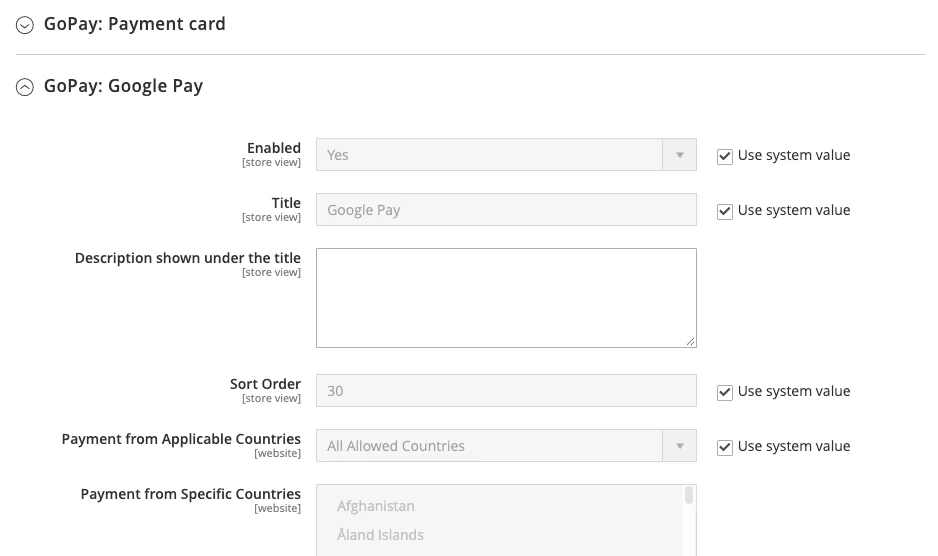
Payment cards (Visa, Mastercard and more), Google Pay and Apple Pay. Apple Pay shows only on devices that can use it.
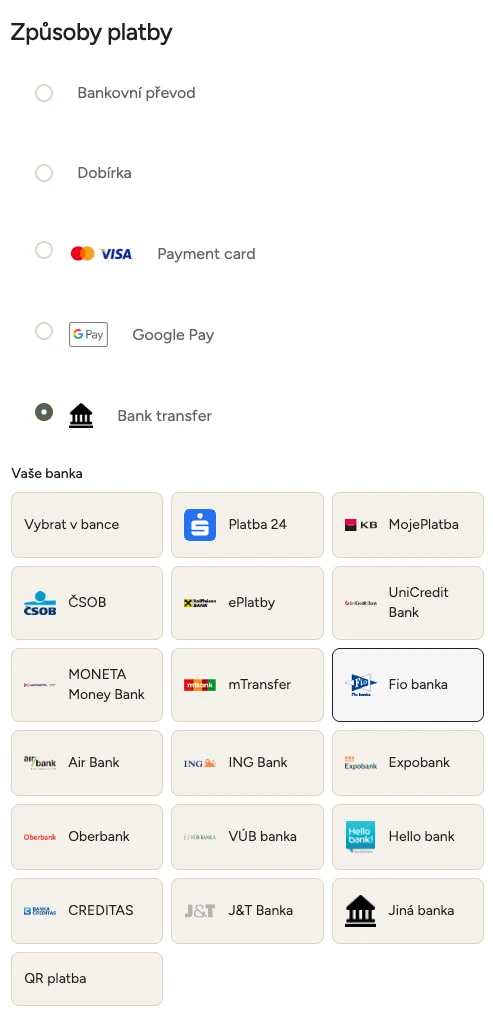
Bank transfer with bank choice, plus QR payment.
PayPal, Click to Pay, Twisto and Skip Pay (pay later or in three instalments), mPlatba, Premium SMS, paysafecard and Bitcoin.
GoPay’s list of enabled methods is checked automatically. Anything GoPay hasn’t enabled for your shop or the cart’s currency simply doesn’t appear in checkout.
Customers paying by transfer pick their bank from tiles (Česká spořitelna, ČSOB, KB, Fio, Air Bank, Raiffeisenbank, MONETA and many more), and GoPay opens straight at that bank, skipping a list of twenty banks.
With Twisto and Skip Pay, the customer chooses between “pay later” and “pay in three” in checkout.
A GoPay payment window over your store, or a classic redirect to GoPay. If the window can’t load, a link to continue appears automatically.
Built for the Deedhold Hyvä themes and Loki Checkout: fast, lightweight and mobile‑friendly.
After paying, the success page shows “Payment successful” with the payment method and the last digits of the card. If the payment didn’t go through, the customer sees a clear message and a “Complete payment” button instead of a generic thank‑you.
Payments fail for everyday reasons: a closed tab, an expired card, a moment of hesitation. So each order gets its own private payment link. The customer can open it any time, with no login, and finish the payment, even with a different method or bank.
The link is where the customer looks: in the order confirmation e‑mail, in their account, on the success page, in an automatic “payment failed” e‑mail and in optional reminders. You can also send it yourself in one click from the order in the admin.
No double payments. While a bank transfer is on its way, the pay page shows “waiting for confirmation” instead of offering to pay again.
Unpaid orders don’t pile up. After a set time (48 hours by default, adjustable per store) they are cancelled, stock is released and the pay link stops working. GoPay is checked one last time first, so a payment that just arrived is never cancelled.
As soon as GoPay confirms a payment, the order is updated and invoiced automatically. No manual checking, no copying payment IDs.
If a GoPay notification ever gets lost, a background check picks the payment up within a day, without constantly polling GoPay.
A payment arriving twice still creates exactly one invoice. A payment for an already cancelled order raises a clear admin alert instead of silently reopening it. An amount that doesn’t match the order is flagged, not invoiced.
An order on hold is invoiced as soon as it’s released.
Send the order confirmation when the order is placed or only once it’s paid. Your choice.
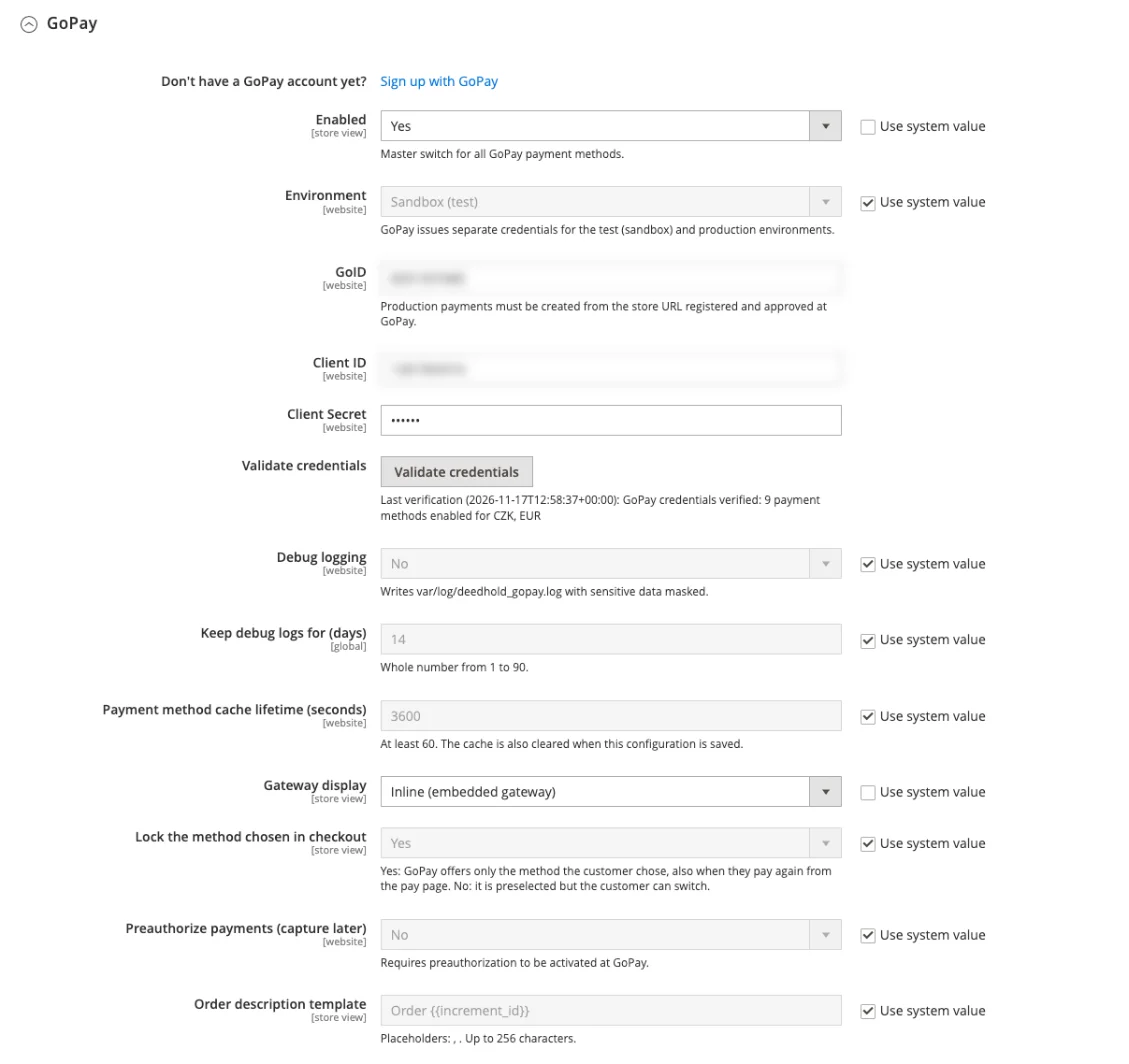
When you save your GoPay details, the module checks them with GoPay immediately and shows how many payment methods are active for each currency. A “Validate credentials” button lets you test before saving.
Sandbox and live environments per website, and different GoPay accounts per website.
Payment in a window over your store or a redirect to GoPay: one setting switches it.
Optional preauthorization and your own order description for GoPay.
Routine refunds happen in Magento. You never need to log in to GoPay for them.
Full and partial refunds straight from a Magento credit memo, sent back to the customer through GoPay.
Several partial refunds on the same order, each tracked separately.
If GoPay rejects a refund, no credit memo is saved, so Magento never shows a refund that didn’t happen.
If GoPay accepts a refund and it fails later, you get an order note and an admin alert.
For stores that ship later or need to confirm stock: the amount is reserved on the customer’s card when they order.
You capture it when you invoice, in full or only part of it, for example when an item is out of stock.
Cancelling the order releases the reservation.
Every payment visible in the admin, and security by design.
The right language and currency per store view (CZK, EUR and more).
Payment details on every order: GoPay payment ID, method, bank or masked card number and current status, in the admin, the customer account and order e‑mails.
A GoPay status column in the order grid you can filter and sort, plus “Check GoPay status” and “Send payment link” on the order.
Fully translated into Czech and Slovak, with English included: checkout, pay page, e‑mails, customer account and admin.
Command-line tools for the technical team: list the methods GoPay has enabled for a shop, or check a payment’s status on demand.
Customers enter card details only on GoPay’s side. Your store never handles card numbers.
Every call to GoPay goes through the official GoPay library.
Client secrets are stored encrypted, and logs hide secrets, tokens and customers’ personal details.
Private pay links use long random tokens, and repeated guessing is blocked automatically.
A strict content security policy on the payment pages, plus an optional allow-list of GoPay’s notification IP addresses.
The ones included in your GoPay contract and switched on in your store. The module checks automatically which methods GoPay has enabled for your shop and currency.
They don’t have to. With the inline option, payment opens in a GoPay window over your store. You can also choose a classic redirect to GoPay.
The order stays open, and the customer gets a private link to pay later: in the confirmation e‑mail, in their account and in automatic reminders if you turn them on. If the order stays unpaid past your time limit, it’s cancelled automatically.
Yes, full or partial refunds from a credit memo, sent back to the customer through GoPay.
Card details are entered only on GoPay’s side, the integration uses GoPay’s official library, and sensitive data is encrypted and masked.
A GoPay merchant account. Don’t have one yet? You can sign up with GoPay straight from your store’s settings. We install, configure and update the module for you, included in the flat monthly fee.
Yes. The module is built for Magento Open Source 2.4.9 and the Deedhold Hyvä themes with Loki Checkout. As part of the Deedhold platform, we install and update it for you.
There is no plugin to install. We install and configure the module for you. All you need is a GoPay merchant account and its credentials (GoID, Client ID and Client Secret), which the Magento admin checks right away.
No. The module is not sold separately. It is part of the Deedhold platform and included in your flat monthly fee, with installation and updates for every new Magento version.
The ones GoPay enables for your shop, typically CZK and EUR. Each Magento store view can have its own language, currency and GoPay account.
The GoPay module is part of Deedhold’s managed platform on Magento Open Source with Hyvä and works alongside the rest of our modules. We install, configure and keep it up to date as part of your flat monthly fee, so there’s no plugin to buy and maintain separately. All modules
Packeta pickup points on a map right in the checkout, plus order export for Packeta.
PPL pickup points on a map right in the checkout, plus order export for PPL (for the Czech market).
A business customer types in their company ID and the rest of the billing details fill in automatically.
Every discount automatically shows the lowest price from the last 30 days.
Cash on delivery only for shipping methods where it makes sense, with a surcharge per carrier.
A cookie bar designed around Czech rules that does not break your Google tracking.

Occasionally, briefly and without spam.
Unsubscribe with one click.
Thanks, just confirm
We sent you an e‑mail with a link - click it to confirm the subscription. Nothing arrived? Check your spam folder.